Showing posts with label Development. Show all posts

Run External Application from Dynamics Ax

March 20, 2008

Calling up external program from Dynamics Ax can be something very interesting to audience during introductory training and demo. Once in a while, I will encounter associates asking if it is possible to run external program, open word document, open a URL in an external browser, etc. from within Dynamics Ax. Usually they will show a sign of immense enthusiasm when I show them how it is achieved. It is like their imagination is exploring all sort of creative ways to make use of this facility.

The interesting part is that executing external application is fairly effortless in Dynamics Ax. X++ is capable of calling Microsoft Windows Application Programming Interface (API). The common functionalities of the Win API have been built in classes WinAPI, WinAPIServer, WinGDI and WinInet. Running external application could be achieved through the static method WinAPI::shellExecute.

Static Method WinAPI::shellExecute

This method takes six parameters where five of them are optional parameters. The following code segment shows the interface of this method.

client static int shellExecute(
    Filename _lpFile,
    str      _lpParameters      = '',
    str      _lpDirectory       = '',
    str      _lpOperation       = #ShellExeOpen,
    int      _show              = #SW_SHOWNORMAL,
    boolean  _waitForCompletion = false
    )

The interface might look complicated but the first parameter is usually all we need to assign. It is sufficient to achieve most of the scenarios. The second parameter allows us to execute an executable with parameters. We will look at examples where this second parameter comes into play later.

Class SysShellExecute

The class SysShellExecute facilitates calling WinAPI::shellExecute. This class has a main method that call the method WinAPI::shellExecute using args.parm() as the first parameter. This enables WinAPI::shellExecute to be called from menu item with ease. This is important Dynamics Ax bring up windows through menu item. Menu item works with buttons with ease.

The following figure shows the property dialog of a menu item using SysShellExecute. The menu item shown will open an Internet Explorer browser when executed.
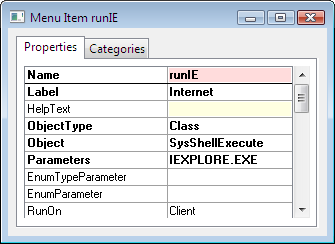
SysShellExecute Menu Item Property

Opening a File or URL

You shall not encounter any issue running application with class SysShellExecute. However, I have received enquiry when it comes to opening a file or a URL. I do not want to go into the ways they have tried. Basically opening file and URL are equally simple.

1. Default Application

Windows has associated different file type to a default application. We just need to execute the file name in order to open that file with the default application. The following figure shows the property page of a menu item that opens the website Dynamics Ax Associate in the default browser.
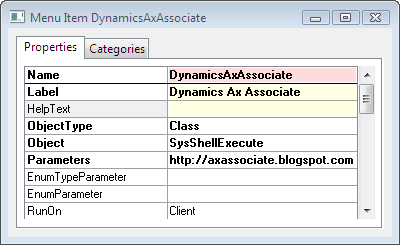
Open URL with SysShellExecute Menu Item

2. Specific Application

The previous approach opens the file or URL in the default application. There are cases where you need to specify the application to open the file with. You may achieve this with static method WinAPI::shellExecute.

Let say the default browser for your computer is FireFox and the website you are opening requires Internet Explorer. You may use the following code to open the URL with Internet Explorer.

WinAPI::shellExecute("IEXPLORE.EXE",
    "http://axassociate.blogspot.com");

Conclusion

The examples given above cover the execution of Windows Internet Explorer and opening of URL. They work similarly with a Word Document, Excel Spreadsheet, etc.

X++ Bitwise Operators

January 30, 2008

Bitwise operations are performed at the individual bits. In other words, the value is converted into binary format and the bitwise operators will act on each and every digit.

Bitwise operation is not very widely used in business solution development. The only time I remember using one was to track a series of states. The advantage is the set of states (true or false) could be altered in one operation. However, readability is not good.

Dynamics Ax provides a set of operators to perform such operation. They will be discussed subsequently. The examples you will find subsequently are base on 32-bit integers. The rest of the operators are Arithmetic and Assignment Operators, and Relational Operators.

& (AND)

This operator performs a binary AND on two expressions.

Syntax

expression1 & expression2

Example

print 10 & 8; //1010 AND 1000
pause; // 1000 -> 8

| (OR)

This operator performs a binary OR to two expressions.

Syntax

expression1 | expression2

Example

print 10 | 8; //1010 OR 1000
pause; // 1010 -> 10

^ (XOR)

This operator performs a binary XOR to two expressions.

Syntax

expression1 ^ expression2

Example

print 10 ^ 8; //1010 XOR 1000
pause; // 0010 -> 2

~ (NOT)

This operator performs a bitwise NOT to the expression on the right.

Syntax

~ expression

Example

print ~10; //NOT 1010
pause; // 11111111111111111111111111110101 -> -11

<< (Left Shift)

This operator requires two operands. Expression on the right specifies the number of bits to shift. A left shift takes the number of bit specified from the left and moves it to the right.

The common use of left shift is to multiply an integer by a power of 2. The syntax is equivalent to expression1 * 2 expression2.

Syntax

expression1 << expression2

Example

print 123 << 3; // 00000000000000000000000001111011 << 3
pause; // 00000000000000000000001111011000 -> 984

>> (Right Shift)

This operator is a reverse of Left shift. It also requires two operands and the expression on the right denotes the number of bits to shift. The different is that it will shift the bits from the right to the left instead.

Syntax

expression1 >> expression2

Example

print 984 >> 3; // 00000000000000000000001111011000 << 3
pause; // 00000000000000000000000001111011 -> 123

X++ Relational Operators

January 15, 2008

The relational operators are frequently used in conditional statements and the where clause of data manipulation statements. Other operators could be found in Arithmetic and Assignment Operators.

like

This operator compares two expressions with wildcards. It is used to evaluate the pattern of an expression. You use * as a wildcard for zero or more characters. The wildcard ? will represents any single character. This is similar to the Criteria Format discussed in Filtering Record in Dynamics Ax.

This operator returns true if the expression on the left matches the pattern supplied on the right. Otherwise, it returns false.

Syntax

expression like pattern

Example

str sExp = "Dynamics Ax associate";
;
print sExp like "*nam??s*ate"; // Output 1 - True
pause;

== (equal)

This operator compares two expressions for difference. It returns true if they are identical and false if they are different.

Syntax

expression1 == expression2

Example

str sExp = "Dynamics Ax associate";
;
print sExp == "*nam??s*ate"; // Output 0 - False
pause;

!= (not equal)

This operator is the opposite of the equal operator. It also compares two expressions for difference. However, it returns true if they are different and false if they are identical.

Syntax

expression1 != expression2

Example

str sExp = "Dynamics Ax associate";
;
print sExp != "*nam??s*ate"; // Output 1 - True
pause;

>=

This operator returns true if expression on the left is greater than or equal to expression on the right.

Syntax

expression1 >= expression2

Example

str sExp = "Dynamics Ax associate";
;
print sExp >= "Dynamics Ax"; // Output 1 - True
pause;

<=

This operator returns true if expression on the left is less than or equal to expression on the right.

Syntax

expression1 <= expression2

Example

str sExp = "Dynamics Ax associate";
;
print sExp <= "Dynamics Ax"; // Output 0 - False
pause;

>

This operator returns true if expression on the left is greater than the expression on the right.

Syntax

expression1 > expression2

Example

int nVar = 30;
;
print nVar > 30; // Output 0 - False
pause;

<

This operator returns true if expression on the left is less than the expression on the right.

Syntax

expression1 < expression2

Example

int nVar = 30;
;
print nVar < 30; // Output 0 - False
pause;

&& (AND)

This operator returns true if both expressions beside the operator is true. It returns false if either of the expression or both expressions are false.

Syntax

expression1 && expression2

|| (OR)

This operator returns true if either of the expressions beside the operator is true as well as when both of the expressions are true. It returns false only if both of the expression are false.

Syntax

expression1 || expression2

! (Not)

This operator takes one expression on its right. It negates the expression on its right. In other words, it returns false if the expression is true and returns true if the expression is false.

Syntax

! expression