This feature is not one of those that are well hidden. It has taken over the shortcut key Ctrl+F that used to call up the Filter by field dialog box. You might even have accidentally brought up this attractive feature during system demo. However it does not work out of the box. Let us look at the configuration required
Dynamics Ax Global Search is new feature added to the task pane in Dynamics Ax 4.0. It enables users to search for information without specifying the table and field as opposed to conventional search. Although the name global, it is not as global as you might first thought. The keyword entered is searched through fields across tables you selected only.
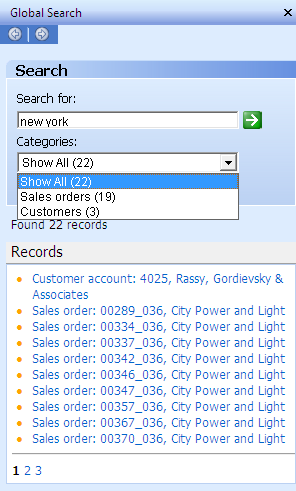
The Global Search Task Pane could be brought up in three ways. You could do it by clicking on the Binocular button on the tool bar, selecting the menu Edit > Find, or by pressing the shortcut key Ctrl + F.
The figure on the right illustrates a Global Search pane with result from the keyword "new york". The Categories combo box allows the user to see results from specific tables only. Clicking on the result would open the form of the designated record with the row focused.
Configuration Procedure
There are two components relevant to this feature. You may find both under menu Basic > Setup > Data Crawler. They are Table Setup and Data Crawler Setup. The former defines the table that you would like searchable within Dynamics Ax Global Search. The latter is the crawler that would build up the search index. Search will be performed on this index and not on the actual data itself.
1. Table Setup
This form is found at the main menu Basic > Setup > Data Crawler > Table Setup. This is where you specify the table that you would like searchable under Dynamics Ax Global Search. The following figures show the Table Setup form.


The Incremental checkbox you find on Overview tab indicates that indexing would be done for newly modified record only. This is only applicable for tables with modified date field. It is automatically checked if the table has the field. You are not given an option to check or uncheck this field.
In the tab Text index, you will find the fields added for indexing as well as two columns named Updated date and Updated time. They indicate when is the last time an index has been built for that table. They have impact on tables with Incremental checked. If you add a new field for text indexing after the table has been indexed, the added field will not be indexed until the data is modified. You will have to recreate index to have the field searchable. Recreating index is discussed shortly.
Tables without incremental checked will not face this problem. You may add a field for indexing anytime. The data crawler will pick it up during it subsequent scheduled crawl.

When you add a new table to the list, you will see a dialog box like the one shown above. The system will ask you whether you want to add all text fields to text index. While this facility eases the setup, it could cost some performance running under production environment. Understanding the intention of Global Search for the company and configuring accordingly is advisable.
2. Data Crawler Setup
You could find Data Crawler setup in Basic > Setup > Data Crawler > Data Crawler. This form is use to configure and manage the state of Data Crawler for each company. The following figure shows the Data Crawler Setup form.

You will get the message “The search indexing engine is not started” for every single search you perform if Data Crawler is not started. The result will still be shown but information might not be up to date. This is where you start the data crawler if it is not configured to start automatically.
You may also set the Data Crawler to start automatically. You do so by checking the Start crawler automatically checkbox in this form. You may define the speed of indexing. The speed settings and the description of the amount of resources it will consume are included in the Crawler speed combo box.
This is the place to recreate index too. We have touched one scenario where re-indexing is required in the previous section. You just have to check the Recreate index checkbox prior to starting crawler to rebuild index.
The option to run crawler in foreground is available from here too. This is done by deselecting the Run in background checkbox. However, I have not found a use for this option as starting the crawler with this option will freeze the Dynamics Ax client. Please let us know if you have found the use of this option.
Final Thoughts
When it comes to data search that spans tables, security control is always a concern. This particular feature has to comply with User Group Permissions and Record Level Security to be useful.